
A complete electrical suite
Voltage drop, cable sizing, short circuit, breaker coordination, busbars, load schedules, earthing, lighting, conduits, transformers, generators, and power-factor correction.

Electrical and mechanical calculations at an institutional level - calculator-style equations, standards-based justification, and a client-ready PDF report carrying your office name.
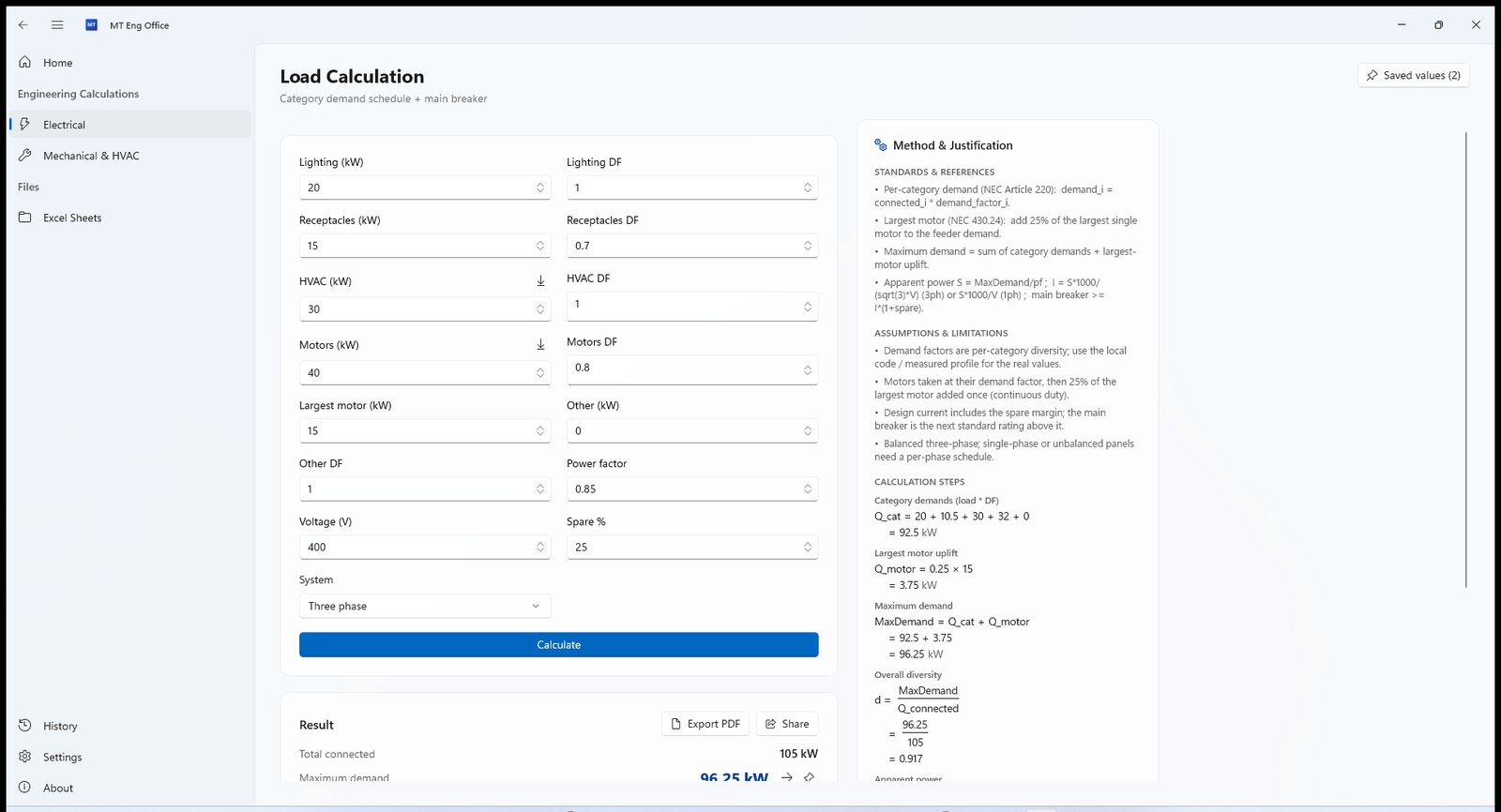
Voltage drop, cable sizing, short circuit, breaker coordination, busbars, load schedules, earthing, lighting, conduits, transformers, generators, and power-factor correction.
Cooling and heating loads, air ducts, chilled-water pipes, fans and pumps, and air-change rates.
IEC, ASHRAE, NEC and BS - every calculator comes with a justification panel citing the reference and assumptions, not just a number.
Real fractions, roots and exponents, every step with its numbers substituted - you review it like a hand-worked sheet.
Send a result from one tool into another in a click - the current from a load calc flows into the breaker and cable with no retyping.
Group all a project's calculations under the client's name and hand over one consolidated PDF with a cover and contents.
Add colleagues by username and set each one’s role - view, edit, or manage.
Every report carries your name, office and licence number - client-ready in a click, shareable to WhatsApp or email.
Open your sheets, edit, and saving syncs automatically - without leaving the app.
A Windows build that installs in a minute and runs with no browser - your calculations work even offline.
Grab the latest Windows build - the download starts instantly and installs in a minute.
Enter your name and office once - they become the header on every report you export.
Open any tool, enter your values, and see the result with its steps and standards on the same screen.
Save your calculations into a project and export one client-ready PDF.
Windows - it runs straight from your machine with no browser.
Electrical, mechanical and HVAC engineers and offices who want documented calculations and client-ready reports.
Yes - every report carries your name, office and syndicate number, along with the calculation steps and standards.
Calculations and PDF export work offline. Syncing and sharing projects need a connection.
 MT-Themes
A professional mobile app for your Zid store - ready-made themes, an AI assistant, push notifications, and live chat with your customers.
MT-Themes
A professional mobile app for your Zid store - ready-made themes, an AI assistant, push notifications, and live chat with your customers.
 MT Manager (Zid)
A desktop app to manage your Zid store: products, orders, inventory, and a cash register straight from your computer.
MT Manager (Zid)
A desktop app to manage your Zid store: products, orders, inventory, and a cash register straight from your computer.
 Automated Blog
AI-written articles published to your store blog automatically - with zero effort from you.
Automated Blog
AI-written articles published to your store blog automatically - with zero effort from you.
Download the app and run your first calculation now.
Download the app